
Moving Planner0.0.10 - Google Play
You'll be able to see results in few seconds.
Publisher Description


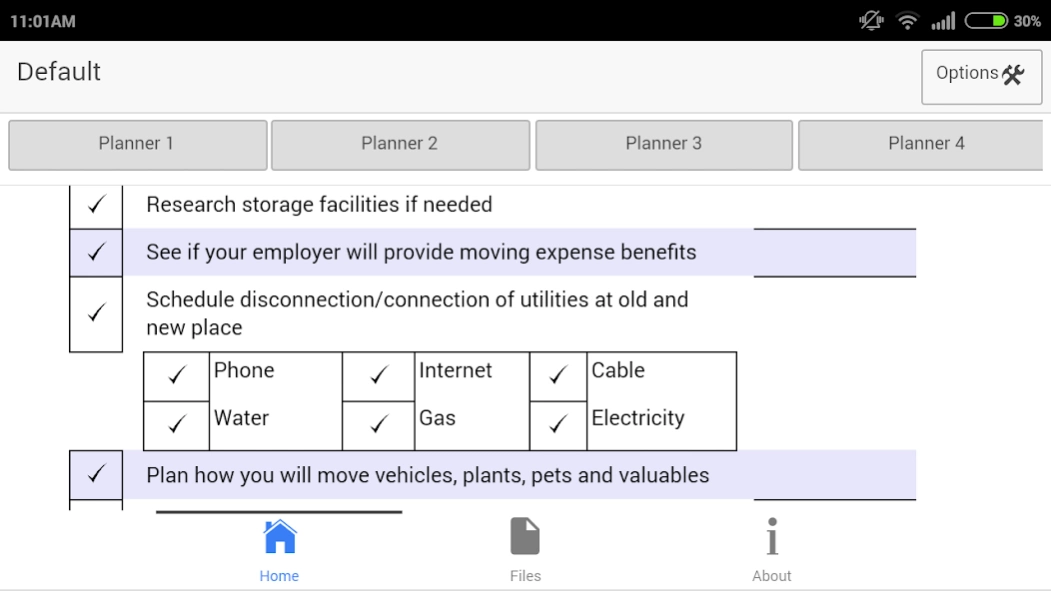

Manage the essential tasks while shifting to a new house using Moving Planner
If you are shifting to a new house and want to manage the essential tasks in an easy and efficient manner, moving planner is an easy to use app for you.
Moving Planner app enables you to summarise and remember the important things required at the time of shifting your home. Different sheets let you organise the tasks based on the time from the day of shifting.
Moving planner 1 sheet focuses on the long term planning that needs to be done. It has been categorised into two portions, referring to 1-2 months before the move and 3-4 weeks before the move. The checkmark functionality also lets you highlight the important items.
Moving planner 2 sheet highlights the relatively short term planning that needs attention before the shifting day. The sheet has been divided into 1-2 weeks and 2-4 days before the move.
Moving planner 3 sheet concentrates on the moving day itself. The items have been placed to help you remember the important things quickly. You can also highlight the important tasks with the checkmark functionality.
Moving planner 4 sheet focuses on the items that need attention after the actual day of shifting.
The items have been made editable for you so you can change them to meet your particular situation and needs. Provision has also been made for you to write additional points in the “Notes” section.
We have added simple sharing capabilities like email and print for all the sheets to help you make the efforts a collaborative endeavor. We hope you find our simple app productive and would like to hear your comments.
About Moving Planner
The company that develops Moving Planner is Aspiring Investments Corp. The latest version released by its developer is 0.0.10.
To install Moving Planner on your Android device, just click the green Continue To App button above to start the installation process. The app is listed on our website since 2016-02-23 and was downloaded 0 times. We have already checked if the download link is safe, however for your own protection we recommend that you scan the downloaded app with your antivirus. Your antivirus may detect the Moving Planner as malware as malware if the download link to com.aspiring.movingplannerphn is broken.
How to install Moving Planner on your Android device:
- Click on the Continue To App button on our website. This will redirect you to Google Play.
- Once the Moving Planner is shown in the Google Play listing of your Android device, you can start its download and installation. Tap on the Install button located below the search bar and to the right of the app icon.
- A pop-up window with the permissions required by Moving Planner will be shown. Click on Accept to continue the process.
- Moving Planner will be downloaded onto your device, displaying a progress. Once the download completes, the installation will start and you'll get a notification after the installation is finished.
Program Details
System requirements
Download information
Pricing
Version History
version 0.0.10
posted on 2016-02-24
- ability to use moving planner on both tablet and phone. Please select tablet as device from "Select Device" option on the top right hand corner while using the tablet version of the app.
- Please backup your files on email/web before updating the app.
Addition of subscription feature. Please register and get 30 days subscription free.
Ability to save files to the web. Kindly register and login using the Accounts tab. After login in we would be able to save files to the server and backup data.
Disclaimer
Official Google Play Link
We do not host Moving Planner on our servers. We did not scan it for viruses, adware, spyware or other type of malware. This app is hosted by Google and passed their terms and conditions to be listed there. We recommend caution when installing it.
The Google Play link for Moving Planner is provided to you by apps112.com without any warranties, representations or guarantees of any kind, so access it at your own risk.
If you have questions regarding this particular app contact the publisher directly. For questions about the functionalities of apps112.com contact us.
